
You are using an out of date browser. It may not display this or other websites correctly.
You should upgrade or use an alternative browser.
You should upgrade or use an alternative browser.
Memory Maps
- Thread starter kiwipride
- Start date

prawns
Moderator
The GPX isnt a HTML filetype - its a gpx filetype your browser is incorrectly deciding it can open
If the file is still wanting to open with notepad after you copy/paste into notepad and rename the file to reflect a .GPX extension - your not renaming the extension correctly (your actually ending up with XXX.gpx.txt -which is still a text file)
You need to change the extension to .gpx not just rename the file to "xxx.gpx" while still keeping the .txt extension you dont want.
Lots of computers automatically hide file extensions for "known filetypes" so this is probably the reason (you cant see the extension to rename it) You need to go into your settings and turn off "hide extensions for known filetypes" then rename the extension for the notepad file for it to work (and only use notepad for copy/pasting these files - wordpad etc potentially wont work due to it adding extra information into the files)
Generally, once you have a proper .gpx filetype, just email it to yourself, and check the email on your ipad/iphone/android and click the attachment - and then select "open with" memory maps
Probably as clear as mud sorry lols
Edit - This is the setting which needs "unticking" else you cannot rename file extensions at all anywhere in windows - so thats a immediate showstopper if its ticked (it hides extensions so its impossible to rename them - your renaming the file "name" not the extension Im nearly 100% sure - Notepad wont attempt to open a actual .GPX file if you double click it which confirms your not changing the files extension
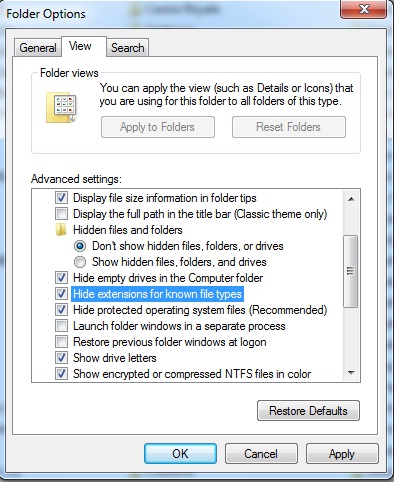
To change the option in the attached picture - first open a folder in windows, then click the "tools" menu up the top (if its not there, press the ALT key and it will show the menu bar) then click on "folder options" and scroll down to check your setting is unticked (its highlighted in blue in the attached pic)
This will allow you to actually rename the extension properly
If the file is still wanting to open with notepad after you copy/paste into notepad and rename the file to reflect a .GPX extension - your not renaming the extension correctly (your actually ending up with XXX.gpx.txt -which is still a text file)
You need to change the extension to .gpx not just rename the file to "xxx.gpx" while still keeping the .txt extension you dont want.
Lots of computers automatically hide file extensions for "known filetypes" so this is probably the reason (you cant see the extension to rename it) You need to go into your settings and turn off "hide extensions for known filetypes" then rename the extension for the notepad file for it to work (and only use notepad for copy/pasting these files - wordpad etc potentially wont work due to it adding extra information into the files)
Generally, once you have a proper .gpx filetype, just email it to yourself, and check the email on your ipad/iphone/android and click the attachment - and then select "open with" memory maps
Probably as clear as mud sorry lols
Edit - This is the setting which needs "unticking" else you cannot rename file extensions at all anywhere in windows - so thats a immediate showstopper if its ticked (it hides extensions so its impossible to rename them - your renaming the file "name" not the extension Im nearly 100% sure - Notepad wont attempt to open a actual .GPX file if you double click it which confirms your not changing the files extension
To change the option in the attached picture - first open a folder in windows, then click the "tools" menu up the top (if its not there, press the ALT key and it will show the menu bar) then click on "folder options" and scroll down to check your setting is unticked (its highlighted in blue in the attached pic)
This will allow you to actually rename the extension properly
Last edited: